Mobile AI studio for on-device video analysis and finishing
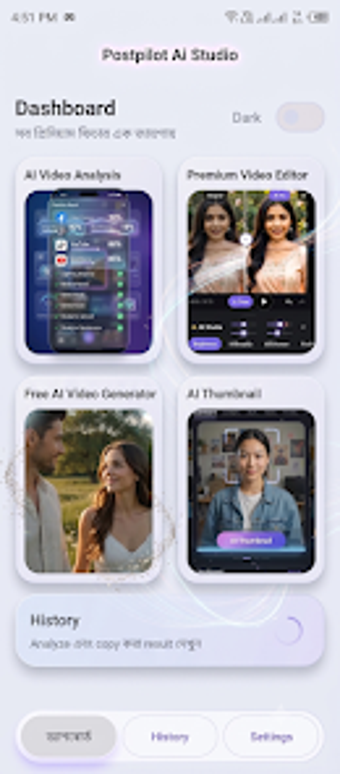
Postpilot Ai Studio, by Raju Tech Solutions, is a mobile multimedia workspace for video analysis and editing. It combines AI-driven quality reports, automated AI Fix enhancements, and a multi-track timeline editor to process footage, generate short treated clips, and design thumbnails directly on Android devices. Key tools include AI Video Analysis, AI Video Generation, AI Thumbnail Creator, and audio mixing, giving creators an integrated mobile workflow.

Unlock your creativity with Adobe Stock
Get 10 images or 1 video with a free trial
Uses AI analysis to prioritize corrective edits
The app puts AI Video Analysis at the start of the workflow, producing structured reports on video quality and content structure that identify problem areas. It applies AI Fix to produce automated corrections for issues detected during analysis, and the analysis output acts as an actionable checklist for color, exposure, and visual repair. This orientation turns diagnosis into a practical editing roadmap for mobile shoots.
Provides a timeline editor and audio mixing for mobile finishing
The tool includes a multi-track timeline where creators can trim clips, arrange sequences, and add text or filters. Its audio workflow supports adding background tracks, previewing selections, and mixing them with original audio or muting source sound. Project History stores previous analysis results and work-in-progress so edits can resume later on the device. The layout maps common editing tasks to on-device controls.
Generates shareable assets but invites provenance and attribution considerations
Alongside timeline work, the app produces short treated clips via AI Video Generation, complete with integrated music for quick outputs, and an AI Thumbnail Creator to pick frames, add titles, and apply visual adjustments. Producing final assets entirely on Android supports rapid publishing. Although convenient, creators should consider content provenance and clear attribution when using AI-generated material in public channels.
Best for Android creators who prioritise analysis-led mobile workflows
The app is a fitting choice for mobile creators who prefer a self-contained Android workspace that brings analysis and finishing together. It rewards solo creators and small teams who publish from devices; the main practical constraint is availability only on Android, which limits cross-device collaboration. For creators committed to mobile-first production, the app offers a focused, analysis-led path to publishable clips.